15 September 2026 · Admin
Which Dell Servers Fit Your Infrastructure?
A replacement host rarely fails at a convenient point in the budget cycle. Dell servers are often bought to solve that immediate problem, but the right purchase should also preserve a sensible upgrade path, match the existing estate and avoid introducing avoidable support complexity.
For UK IT teams, the key question is not simply whether a server has enough processor cores or drive bays. It is whether the platform, configuration and generation suit the workload, rack environment and expected service life. A correctly specified refurbished PowerEdge can provide enterprise capability at a substantially lower capital cost than a new platform, particularly where the surrounding infrastructure is already established.
Dell servers: start with the existing estate
If the requirement is capacity expansion, a replacement node or a like-for-like standby system, begin with the hardware already in production. Matching the PowerEdge generation can simplify memory reuse, firmware management, rail compatibility and the spares position. It can also reduce the testing required before deployment.
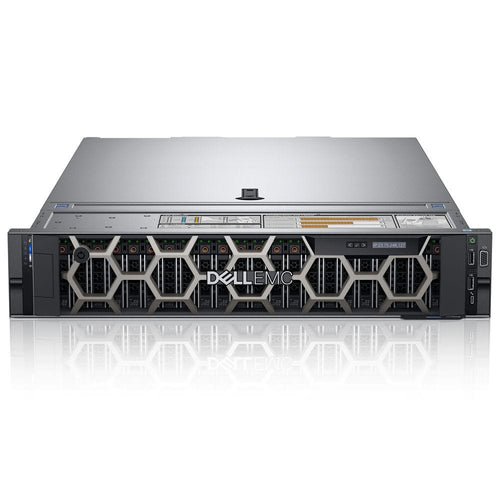
For buyers planning this kind of deployment, DELL DELL-R740-8LFF - DELL Poweredge R740 (8Lff) Configured to Order - Refurbished is a relevant option to consider. Please check the listed specification, condition and compatibility before ordering.
Dell 12th Generation systems such as the PowerEdge R620 and R720 remain relevant for established virtualisation, backup and general-purpose workloads where DDR3 memory and Intel Xeon E5-2600 v1 or v2 processors are already standard in the estate. They are cost-effective where application demand is stable, although buyers should consider their remaining lifecycle and power consumption before adding further nodes.
Dell 13th Generation platforms, including the R630 and R730, are frequently selected for their balance of price, DDR4 memory support and broad availability of Xeon E5-2600 v3 and v4 processors. For many small and mid-sized estates, they remain a practical choice for virtualisation clusters, SQL workloads, file services and line-of-business applications.
Dell 14th Generation servers such as the R640 and R740 move to Intel Xeon Scalable processors and offer a stronger basis for memory-heavy workloads, denser virtualisation and expansion requirements. They are usually the better option where the server will remain in service for several years, where NVMe capability matters, or where a newer management and firmware baseline is required.
Generation matching is useful, but it is not an absolute rule. A newer host can be the correct answer if it reduces rack footprint, supports the required storage configuration or gives enough CPU and memory headroom to consolidate older equipment. The trade-off is that a mixed estate may need separate spare parts, different firmware procedures and more careful operational documentation.
Check the exact chassis, not just the model family
A PowerEdge model name does not tell the full configuration story. The same server family may be supplied with different backplanes, drive bay counts, risers, network daughter cards, power supply ratings and storage controllers. An R740 configured for eight 2.5-inch drives is a different procurement decision from an R740 with a higher-capacity 3.5-inch storage chassis.
Before ordering, confirm the required drive form factor, whether front-access storage is sufficient, and the number of PCIe slots needed for NICs, HBAs, GPUs or specialist cards. Rail kits, bezel requirements, cable routing and available rack depth should also be checked where the server is being installed into an existing cabinet. These details are routine, but they are also common causes of last-minute deployment delays.
Match the server to the workload
Processor selection should be based on the application licence model as well as performance. A high-core-count configuration is not always commercially sensible if database, virtualisation or analytics software is licensed per core. In that case, fewer higher-frequency processors may produce a better result. Conversely, VM density, parallel processing and container hosts can justify more cores where licensing and thermal limits allow.
Memory capacity needs the same level of planning. Buying a server with the minimum RAM required today can create an unnecessarily expensive upgrade later if the initial DIMM layout consumes too many slots. Where possible, specify capacity in a balanced arrangement that leaves clear expansion options. The correct population pattern depends on the processor count, memory channels and DIMM type, so it should be checked against the server's supported configuration rather than assumed from the total GB figure alone.
Storage should follow the data profile. Boot volumes, virtual machine datastores, database files, archival capacity and backup repositories have different IOPS, endurance and resilience requirements. A pair of SSDs in RAID 1 may be appropriate for the operating system, while a larger RAID 10 or RAID 6 array may suit application data depending on performance and rebuild considerations. For software-defined storage or direct-attached JBOD requirements, an HBA may be more appropriate than a hardware RAID controller.
The controller, cache module and battery or capacitor arrangement matter. A RAID controller that is suitable for bulk SATA capacity may not be the best choice for a write-intensive VM datastore. Similarly, confirming whether the server uses SAS, SATA or NVMe drive bays prevents a specification that looks correct on paper but cannot support the intended media.
Do not overlook networking and power
Network requirements are often set by the existing switch estate. A replacement server may need 1GbE for a legacy environment, 10GbE for virtualisation traffic or higher bandwidth for storage and replication. Confirm port type, transceiver or DAC compatibility, and whether separate interfaces are required for management, production, backup and storage networks.
Power supplies should be specified as a pair where redundancy is required, with sufficient wattage for the processor, memory, storage and expansion-card load. Higher-wattage PSUs are not automatically better if the server configuration does not need them, but under-specifying power limits future expansion and can complicate a later GPU or high-density storage upgrade. Check the site's available feeds and plug type as part of the same review.
Build in a practical spares strategy
Refurbished infrastructure delivers most value when it supports lifecycle management rather than a one-off purchase. Common field-replaceable items such as memory modules, drives, power supplies, fans, RAID cache components and network cards are worth identifying before a failure occurs. Keeping a small, compatible spares holding can be more economical than maintaining an additional complete server, particularly for non-clustered workloads.
For cluster nodes, a like-for-like spare or a defined replacement specification is often justified. The aim is not to duplicate every production host exactly. It is to ensure that a failed system can be restored or replaced within the business's recovery objective without waiting for a component search during an outage.
This is also where refurbished hardware has a clear operational advantage. Discontinued generations can remain supportable when compatible components are still available from a specialist supplier. A failed controller or power supply does not necessarily require a wholesale platform refresh, especially when the server still meets the performance requirement.
Refurbished Dell servers: assess value beyond the ticket price
The lowest-priced unit is not always the lowest-cost option. Compare the installed processor model, memory quantity and speed, controller specification, drive cage, NICs, power supplies and included rails before comparing prices. A bare chassis may suit a buyer reusing stock components, while a fully configured server can be more efficient where deployment time is limited.
Ask whether the intended operating system, hypervisor and management tooling remain compatible with the platform. Consider firmware policy, security requirements and the point at which the business expects to retire the equipment. A Dell 13th Generation system may be an excellent fit for a three-year extension to an established environment; a Dell 14th Generation platform may justify its higher cost where the server is expected to carry a new service for longer.
KahnServers supports this approach by supplying complete refurbished enterprise systems alongside the components needed to repair, expand or reconfigure them. That matters when procurement is driven by a specific part number, DIMM type, controller or generation rather than a broad server category.
A well-chosen server should make the next maintenance window less complicated, not more. Specify the platform around the workload and existing infrastructure, leave sensible room for growth, and record the exact configuration while it is still fresh. That discipline turns a cost-effective hardware purchase into infrastructure that remains serviceable long after it is racked.
\nExplore related products
DELL DELL-R720-16SFF - Poweredge R720 (16Sff) Configured to Order - Refurbished